Business hours
Monday to Friday (8.30AM - 5PM)
Weekend (Closed)


You're probably looking at your balance sheet and doing the same mental arithmetic a lot of Australians do near retirement. You're wondering whether to leave super alone, help the kids, sell something, or sit tight and see what Centrelink says. That's exactly where a Centrelink Asset Test Calculator earns its keep, but only if you feed it the right inputs.
Many assume the maths is the hard part. It isn't. The hard part is deciding what counts, what doesn't, and which household label applies to you. Get that wrong, and a 30-second estimate becomes noise.
If you're trying to make sense of the broader retirement picture, the CAPS 2026 incontinence payment guide from Nursing Assessment Australia is a useful companion read because it sits in the same messy real-world space, where eligibility, medical needs, and government rules overlap.
When a Centrelink Asset Test Calculator Actually Matters
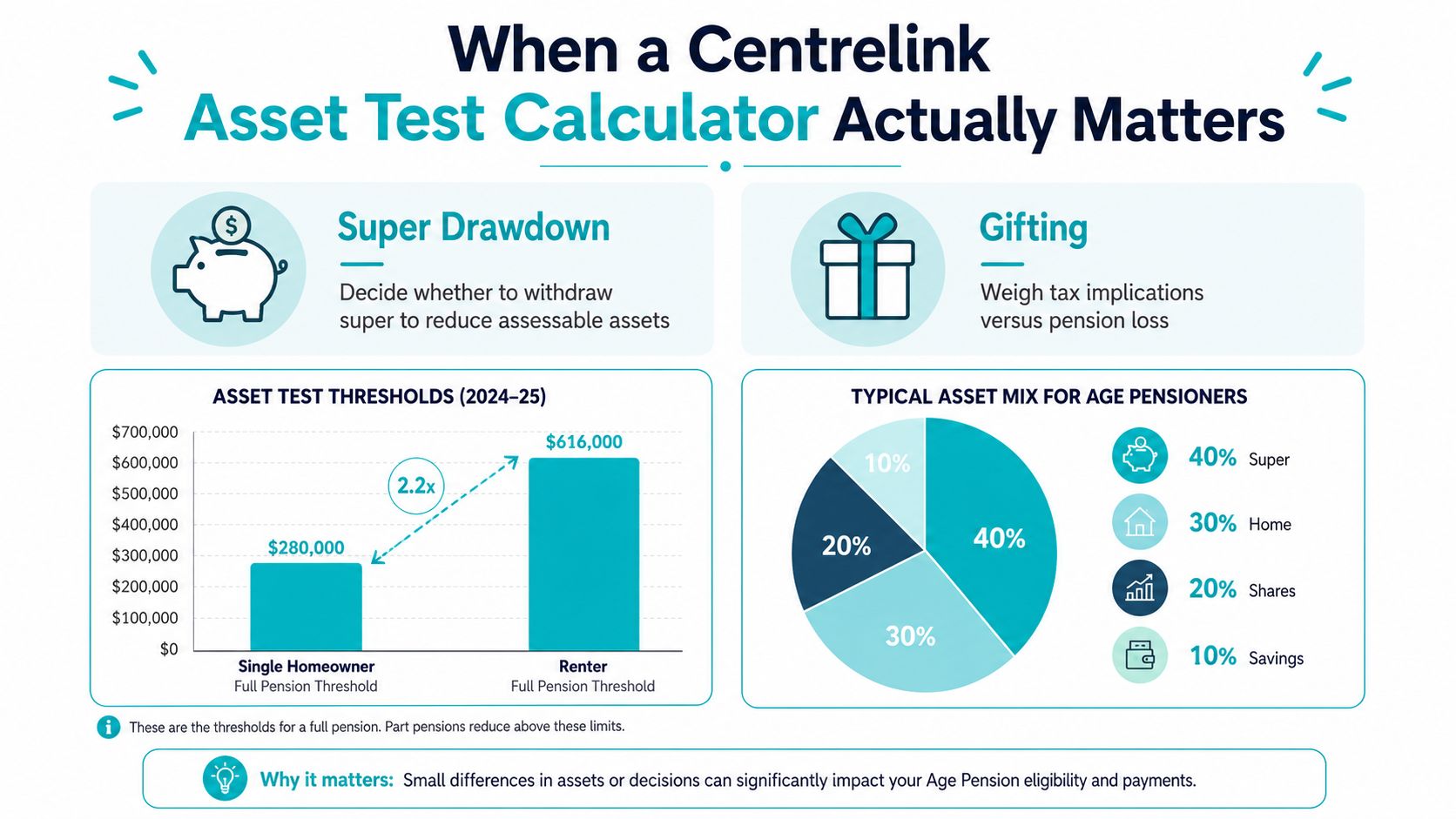
A couple sits down with the retirement numbers and faces three choices. Draw super now, help a child with a deposit, or keep the investment property and wait for Age Pension entitlement to fall into place. That is the point where a Centrelink Asset Test Calculator earns its place, because it shows quickly whether the assets are close to the line or miles away from it.
The calculator matters because the asset test is blunt in outcome and fussy in detail. You end up in the full-pension zone, the part-pension zone, or nil. The result can change on something as basic as whether the home is excluded properly, or whether a car has been entered at market value instead of hopeful value. Services Australia lists bank accounts, shares, managed funds, accessible super, investment property, vehicles, and business assets as assessable, and its gifting rules also shape the result, while the principal home sits outside the test under the usual rules Services Australia asset test guidance, Services Australia gifting rules.
Don't trust a quick guess
A quick estimate is fine if your position is simple and comfortably below the limit. It falls apart if you are close to the edge, have gifted money, or own more than cash and super. The calculator is a screening tool, not a final decision.
Practical rule: if one input would change whether you qualify, the calculator is only the starting point.
That is why the Wealth Collective process does not stop at the number on screen. It starts there, then checks whether the inputs match your household. If you want a second set of eyes on the numbers, that is the point of a proper advice conversation.
The Four Inputs Every Calculator Needs First
Start with relationship status. A proper calculator needs to know whether you're single, a couple, or separated, because Centrelink applies different thresholds to each household type. If one partner is in care, living apart, or the relationship has changed, put the actual status in first. Guessing here gives you the wrong result before you even touch the asset figures.
Then enter homeownership status. This is not a side detail. Centrelink treats homeowners and non-homeowners differently, and the full-rate thresholds sit at different levels for each group, so the answer changes before you even enter a dollar amount Retirement Essentials on assets test thresholds.
The date matters more than people think
Set the assessment date next. Centrelink thresholds move over time, and calculator pages can lag behind the current rates. Going Rate notes that by 20 March 2026, the full-pension limit for a single homeowner had risen to about $321,500, with a homeowner couple at about $481,500, while earlier 2025-26 guidance still showed figures like $314,000 and $470,000 Going Rate calculator page. If your calculator is using the wrong date, the result is already stale. For the current official thresholds, check the relevant Services Australia rate card before you rely on the number.
The last input is Age Pension age confirmation. Some assets change treatment once you've reached pension age, especially superannuation that becomes accessible. Miss that timing point and you can misclassify a large chunk of your wealth.
A common mistake is entering the couple details from the wrong angle when one partner is in care. Do not slice the household up emotionally and then hope the calculator agrees. Use the relationship status Centrelink would apply, not the one that feels neatest on paper.
What Counts as an Assessable Asset and What Does Not
The cleanest way to use a calculator is to think in two piles. First, the assets Centrelink can count. Second, the things it generally leaves alone. If you blur those piles, your result will be wrong before the calculation starts.
What usually goes in
Assessable assets normally include bank accounts, shares, managed funds, account-based pensions once accessible, investment property at market value, business assets, vehicles, and household contents. The key point is valuation. Centrelink-style assessments are not sentimental, and they're not replacement-cost based. A car, for example, is counted at what it would reasonably sell for, not what you paid years ago.
The principal home is generally excluded, which is why the house you live in is not part of the Age Pension assets test. If you want a plain-English explanation of that exemption, use this main residence exemption guide as a reference point when you're sorting through the family balance sheet.
What usually stays out
Certain items don't belong in the count. The home is the obvious one. Some pre-paid funeral arrangements and personal effects are also treated differently, which is why you should not dump every household item into a calculator at face value. Centrelink does not want a shed full of old furniture entered at retail replacement price.
| Asset Category | How the Calculator Treats It |
|---|---|
| Bank accounts | Assessable |
| Shares and managed funds | Assessable |
| Accessible super and account-based pensions | Assessable |
| Investment property | Assessable at market value |
| Vehicles | Assessable at market value |
| Business assets | Assessable |
| Household contents | Assessable at Centrelink-style value |
| Principal home | Exempt |
Don't ignore gifting
Gifting can trip people up badly. Gifts above $10,000 in a financial year or $30,000 over five years can still be counted for five years, so money handed to the kids is not automatically gone in Centrelink's eyes supercalcpro gifting rule explainer. Enter the gift accurately.
Bottom line: if it has value, ask whether Centrelink would treat it as still yours.
Reading the Result and What the Taper Is Really Telling You
A calculator result only helps if you read the labels properly. Full pension means your assessable assets sit under the full-rate threshold. Part pension means the asset test has started cutting into your entitlement. Nil pension means you've gone past the cut-out point and the asset test has done its work.
The taper is the part many retirees misunderstand as a flat reduction, rather than a reduction applied for each $1,000 above the limit. Once you're over the full-rate threshold, the pension falls by $3 per fortnight for every $1,000 above that line, which works out to about $78 per year for every $1,000 Retirement Essentials on the assets test. That is a direct hit to cash flow, and it keeps running until you reach the cut-off point.
Two households, same asset figure, different outcome
Take a single homeowner with about $400,000 in assessable assets. Under the current thresholds, that person is already over the full-pension line, so the calculator should return a part pension outcome. Now compare that with a homeowner couple at the same $400,000 level. They're still under the couple homeowner full-rate threshold, so they should still receive the full rate on the asset test side.
That is the part people miss. The same balance sheet can produce two very different answers depending on how the household is classified.
If you want to check the broader pension picture, use the Age Pension eligibility calculator alongside the asset test. Income and deeming can shift the final answer even when the asset result looks clear.
The asset test is only half the story
A good calculator should also remind you that the asset test is only one of two tests. The other is income. Financial assets can create deemed income even when the bank account balance itself does not change, so do not treat the asset result as the whole pension picture.
Plain English: the calculator tells you where the asset test lands, not whether the income test will agree.
Worked Examples That Show How Small Inputs Change the Outcome
A single renter with a large share portfolio is the sort of case that exposes bad inputs fast. Say the household is correctly entered as single and non-homeowner, with $600,000 in assessable assets made up of shares and modest super. Under the current non-homeowner thresholds, that person sits above the full-pension line but still below the cut-out, so the calculator should show a part pension result. The decision then is not the arithmetic. It is whether the assets have been classified correctly, because that is what drives the outcome Retirement Essentials on the assets test.
The second example is a couple homeowner with $850,000 across super and investments. If the home is excluded properly and the rest of the assets are entered correctly, they can still sit inside the homeowner couple limit on the asset test side. That result changes quickly if someone mislabels the household or counts the principal residence by mistake Services Australia asset test guidance. Household status matters, but only after the asset types are sorted out properly.
A third example shows why gifting can distort the answer. A client who gives away money and still expects the calculator to ignore it is asking for the wrong result. Gifts above the allowable limits can keep counting for years, so the calculator needs the gift entered as a deprivation issue, not treated as money that disappears from the picture.

The same number can mean different things
A calculator is not just checking a balance against a threshold. It is asking who owns the assets, whether the person is a homeowner or non-homeowner, and whether any items are exempt before the test even starts.
That is where small input errors do real damage. Overstate household contents, include the home by mistake, or miss a gift that is still inside the deprivation period, and the result on screen becomes misleading fast. The arithmetic can be correct and still produce the wrong answer because the inputs were wrong.
Rule I use with clients: if the scenario feels tidy, check it again. Centrelink files rarely are.
Common Mistakes That Quietly Push Your Result the Wrong Way
The first mistake is overvaluing household contents. People love the convenience of a round number, but Centrelink does not assess your lounge room on replacement cost. It's closer to what the items would fetch, not what you'd pay to buy them all again.
The second is forgetting accessible super and account-based pensions. If the money is accessible under the rules, it belongs in the asset test. That catches plenty of retirees who assume any money in super is automatically invisible.
The hidden traps advisers see all the time
- Overvaluing household contents: Don't use replacement cost when the assessed value is much lower.
- Forgetting gifts: Gifts above the allowable limits can still count for years.
- Misreporting super: Include super once it's assessable, even if you haven't touched it.
- Ignoring deeming rules: Financial investments are treated as earning assumed income regardless of actual returns state pension calculator asset test discussion.
The third mistake is double-counting. Couples sometimes enter the same asset in both names and then add it again as a joint asset. That creates a fake total, and a fake total leads to a fake answer.
The fourth is ignoring deeming. Your bank balance and share portfolio can generate assumed income under the income test, even if the actual return was weak. That's why a calculator that only totals assets is incomplete. Project FI's explanation makes the point clearly, especially for business owners, investment property holders, and retirees who've shifted super into pension phase but still think it's all exempt Project FI on the asset test.
Before you trust any calculator result, run this quick check:
- Classify the household correctly before entering assets.
- Exclude the principal home unless the tool specifically says otherwise.
- Use market value for cars, boats, shares, and property.
- Review gifting history for the last five years.
- Check Age Pension age so super is treated properly.
If the result still looks odd after that, the calculator isn't the problem. The inputs are.
Turning a Calculator Result Into a Real Plan
A clean calculator result is useful only if you do something with it. If you're miles below the threshold or clearly above the cut-out, DIY is usually enough for a first pass. You know where you stand, and you can move on.
The grey zone is where advice earns its fee. Blended families, business owners, investment property holders, and anyone sitting close to a threshold need more than a quick online estimate. In those cases, the asset test is only one piece of the retirement structure, and the wrong move can cost flexibility later. A calculator also won't tell you whether downsizing, restructuring, or super timing should be considered alongside pension planning, which is why this downsizing in retirement guide can be relevant when the home itself becomes part of the conversation.
Wealth Collective's process is built for that middle ground. It starts with a free 10-minute introductory call, then moves into a plan shaped around Protection Plus, Guided Growth, and Retirement Roadmap. That's the right sequence if you want the number on screen translated into an actual decision, not just bookmarked for later.
My recommendation
Don't keep rerunning the calculator and hoping the answer changes. If the result affects timing, gifting, super, or whether you hold an investment property, get a view that fits your situation. That's the difference between a guess and a plan.
If you've run the numbers and the result still doesn't feel settled, book an initial call with Wealth Collective and get the inputs checked properly before you make the next move.